
 FlowMic
 Pricing: Free vs Pro and Max Plans Explained
FlowMic pricing has three monthly tiers: Free at $0, Pro at $12 a month, and Max at $28 a month. FlowMic turns your phone into a microphone that puts spoken words into the text box at your computer cursor. Every tier gives you the same three modes, "Realtime", "Translate", and "Organize", so you only choose how many managed transcription minutes and computers you need. Before installing from the download page, you can also test speech recognition in your browser on the try page, which gives each browser identity a 120-second trial without signing in.
What does the Free plan cover compared to Pro and Max?
FlowMic offers three plans that share all features and differ in monthly managed transcription quota, computer count, and single long-recording length. Free costs $0 for 20 minutes a month of managed transcription and 2 computers. Pro costs $12 a month for 1,000 managed minutes a month and 3 computers. Max costs $28 a month for 3,000 managed minutes a month and 10 computers.
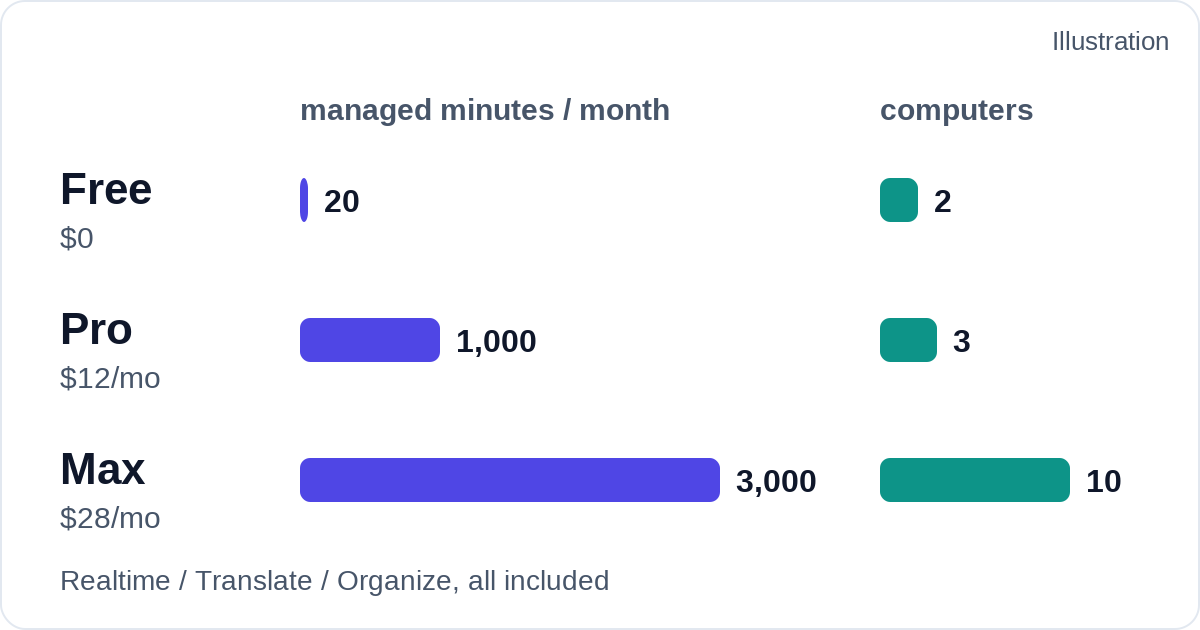
Here is how the three tiers line up on the pricing page:
- Free (Starter, $0): includes 20 minutes a month of managed transcription and 2 computers for quick memos and light dictation. When signed in, each long recording has a separate per-recording limit of up to 10 minutes.
- Pro (Productivity, $12 a month): includes 1,000 managed transcription minutes a month and 3 computers for daily work and frequent typing. When signed in, each long recording can run up to 30 minutes.
- Max (Professional, $28 a month): includes 3,000 managed transcription minutes a month and 10 computers for heavy writing and multi-device workflows. When signed in, each long recording can run up to 30 minutes.
If you need more than 10 computers, you can purchase an additional subscription. FlowMic is open source (AGPL-3.0), and running your own relay and your own speech engines is free and is not metered.
Do all plans include the same modes?
Yes, Free, Pro, and Max include the exact same modes and capabilities, because FlowMic does not lock features behind paid tiers. On every plan, you choose one of three modes per recording: "Realtime" for recognized words in the language you speak, "Translate" for output in another language, or "Organize" for tidy written text in the same language.
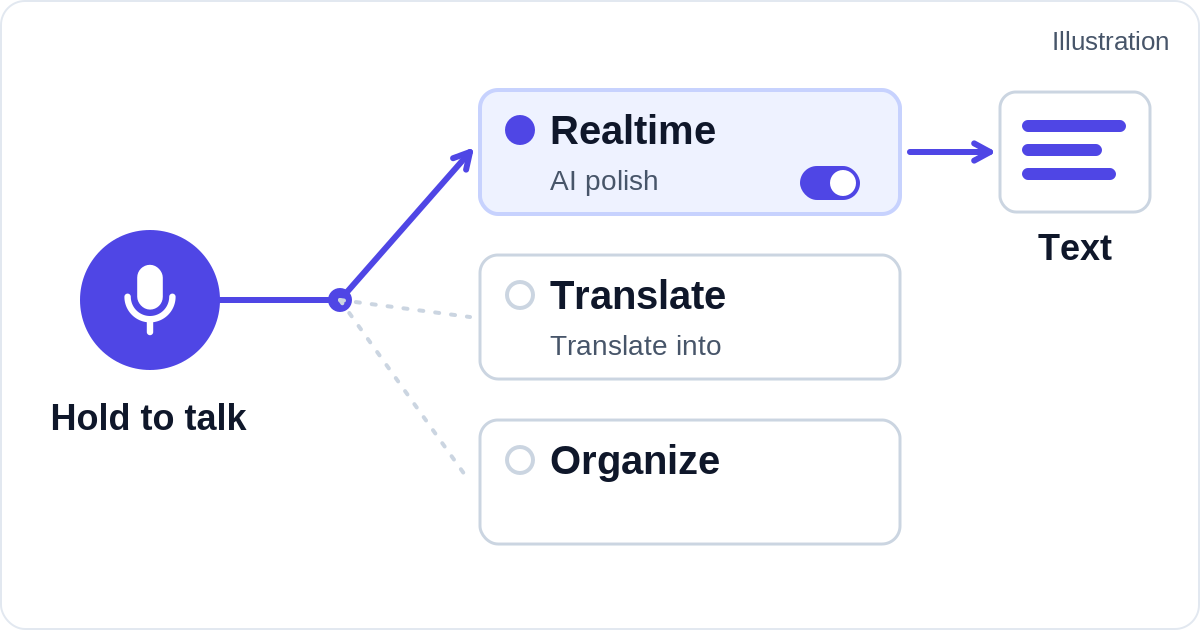
Inside "Realtime" mode, you can toggle the "AI polish" switch between "Strict" and "Smooth" to have a language model lightly edit the final text. "AI polish" is a switch inside "Realtime", not a fourth mode. In "Translate" mode, you speak in one language and get only the translation in the target language chosen under "Translate into", which offers 9 target languages with simplified and traditional Chinese counted separately. In "Organize" mode, FlowMic removes fillers and false starts to produce tidy written text in the same language you spoke.
For a first setup on any plan, see dictation without setting up a speech model.
When does it make sense to move from Free to Pro or Max?
The Free plan covers light use, such as the odd message, a prompt now and then, or notes taken while away from your desk. If you dictate for most of the day, you will use up the 20 minutes a month on the Free plan before the billing cycle ends, which is when Pro or Max makes sense.
You can also choose a tier based on how many computers you use. Free covers 2 computers, Pro covers 3 computers, and Max covers 10 computers, which fits using one phone with several computers across your desk and laptop. Paid subscriptions are billed monthly in US dollars with no yearly plan. New subscriptions have a 14-day right of withdrawal as explained on the refund policy page, and canceling stops the next renewal while keeping your paid benefits active until the end of your current billing period.
How do you sign up, subscribe on the website, and dictate?
You create your account and subscribe on the FlowMic website by opening the billing page in your account, choosing a monthly plan, and paying by card. Once you sign up on the website, you are on the Free plan straight away, and you can install the apps, pair your phone, and dictate into ordinary text boxes in browsers and programs.
- Go to the pricing page on the FlowMic website and sign up for an account. You start on the Free tier quota right away.
- If you want Pro or Max, open the billing page in your account on the FlowMic website, choose a monthly plan, and pay by card.
- Get the desktop and mobile apps from the download page, or install them from the App Store, Google Play, Microsoft Store, or GitHub Releases. On macOS, move FlowMic into the Applications folder before first opening it and grant Accessibility permission.
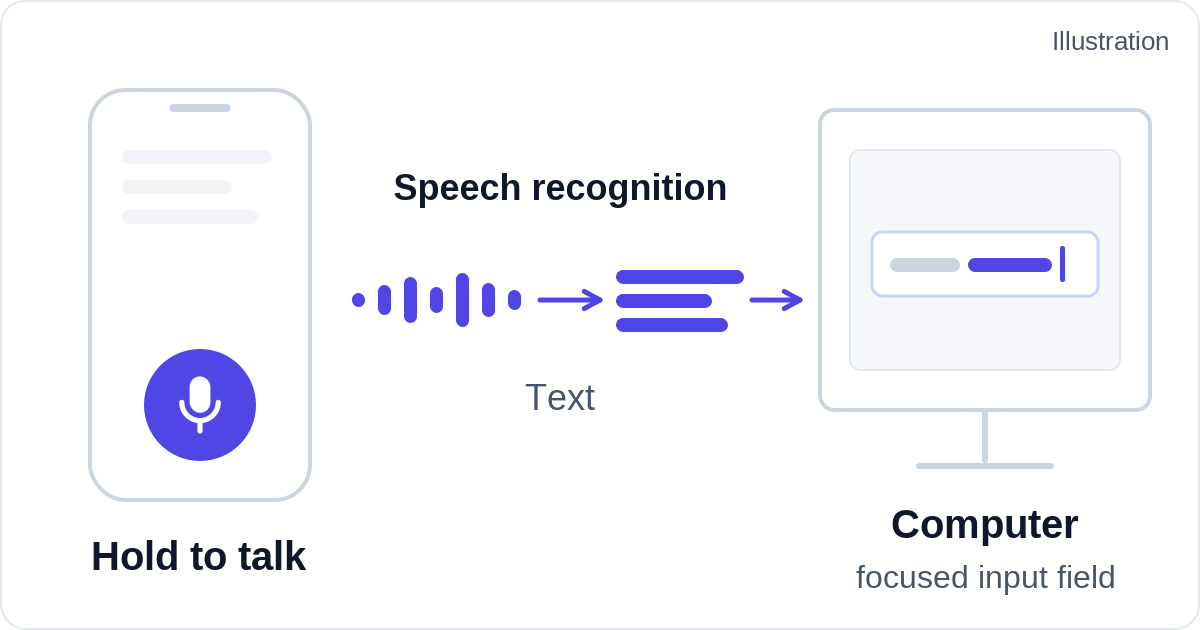
- Open the computer app and phone app to pair them, then click inside a text box on your computer so the cursor is waiting where you want the words to appear.
- In the phone app, press and hold "Hold to talk" and speak. Let go to finish recording, wait for the words to appear at your computer cursor, look them over, and send them the way you normally do.
Common questions
What does the Free plan include?
The Free plan costs $0 and gives you 20 minutes a month of managed transcription across 2 computers. You get all three modes: Realtime, Translate, and Organize. When signed in, long recording has a separate per-recording limit of up to 10 minutes on the Free plan.
How much do Pro and Max cost?
Pro costs $12 a month for 1,000 managed minutes a month across 3 computers. Max costs $28 a month for 3,000 managed minutes a month across 10 computers. Both plans are billed monthly in US dollars, and you can cancel at any time.
What is the difference between Free, Pro, and Max?
All three plans include Realtime, Translate, and Organize modes. They differ in managed transcription quota (20 minutes a month on Free, 1,000 on Pro, and 3,000 on Max) and computer count (2, 3, or 10). When signed in, the per-recording limit for long recordings is up to 10 minutes on Free and up to 30 minutes on Pro and Max.
How do I subscribe or cancel?
You subscribe on the FlowMic website. Sign up on the website to start on Free right away, or open the billing page in your account on the website to choose Pro or Max and pay by card. You can cancel anytime, and paid benefits stay active until the end of your billing cycle.
Can I try FlowMic without signing up?
Yes. You can test FlowMic on the website try page without signing in. Each browser identity gets a 120-second trial that does not reset daily. When you are ready to install the app on your computer and phone, signing up on the website puts you on the Free plan right away.