
 FlowMic
Stop Voice Typing From Cutting You Off Mid-Thought
Most voice keyboards run a short two-second silence timer, so stopping mid-sentence to choose the right word snaps the mic shut right in the middle of your thought. FlowMic—an open-source (AGPL-3.0) app that sends spoken words from your phone to your computer's cursor—lets you set the start and end yourself with Hold to talk, keeps silent pauses quiet, and gives you Hold to append and Long recording when you need real time to think.
Why do automatic voice keyboards cut people off?
Hands-free dictation tools try to guess when you finished talking by listening for dead air. Pause to verify a version number or frame the second half of a sentence, and the timer fires—splitting your thought in two or turning background hum into stray filler words.
FlowMic removes that guessing game through its push-to-talk button. Audio captures for as long as you hold Hold to talk (labeled Release to end while active) and stops only when you let go—while VoiceOver and switch-control users have a two-step toggle action.
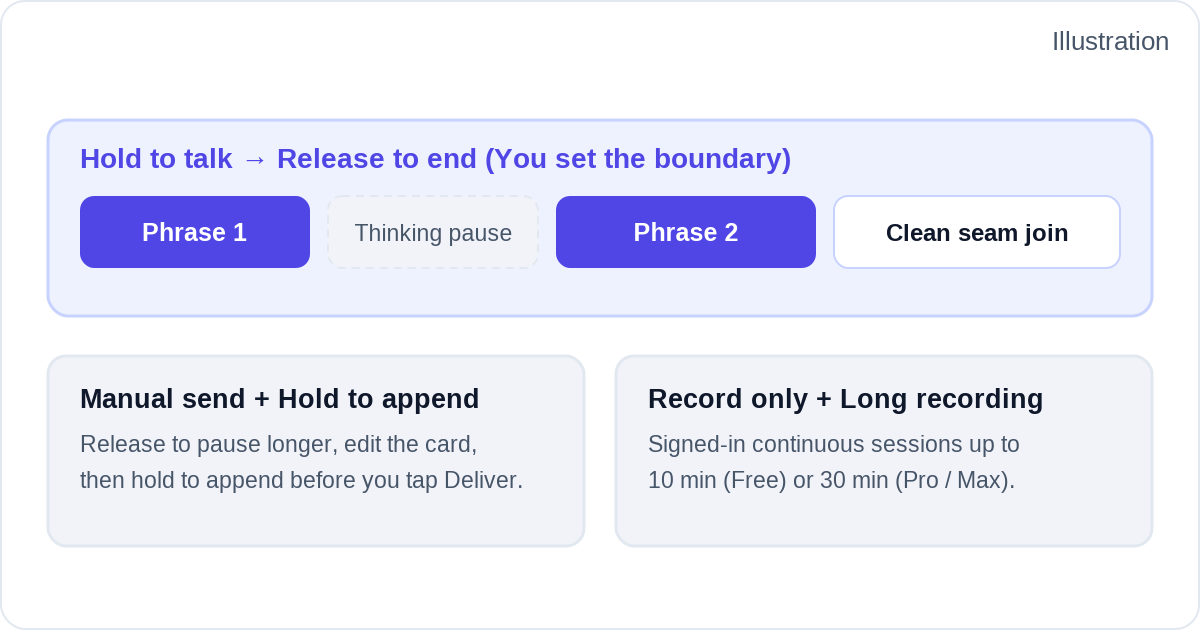
Three ways to think out loud at your own pace
Not every pause lasts two seconds. Sometimes you only need a breath; other times you want a full minute to organize what comes next.
- Short pauses mid-thought (keep holding Hold to talk): FlowMic gates empty room noise during silence so quiet moments do not invent phantom words, then picks right back up when you resume speaking. Through longer holds in Realtime, speech splits into steady chunks and joins cleanly across seams at your cursor.
- Pause, read, and add more (Manual send + Hold to append): Flip the send toggle to Manual send for careful drafts. Speak the first half, let go to read the card and think, then hold Hold to append to tack on the next sentence before tapping Deliver.
- Extended thinking sessions (Record only + Long recording): Switch the destination to Record only while signed in and start Long recording in Realtime mode for up to 10 minutes per take on Free, or 30 minutes on Pro and Max—matching the voice memo workflow.
Habits that make paused speech read cleanly
You do not need to stretch out "uhhh" or "sooo" anymore just to keep a silence timer alive.
- Let yourself pause in real silence while thinking; with Strict or Smooth AI polish turned on, clean pauses usually yield much tighter sentences than forced filler noise.
- Glance at the live text only after you finish a phrase instead of self-correcting mid-clause.
- For multi-minute sessions, check the segmented draft in your phone timeline, compare plan limits on the pricing page, and download the apps on the download page.
Common questions
Does FlowMic stop listening if I pause for two seconds mid-sentence?
No. While you hold Hold to talk, you control when the recording ends. Quiet pauses inside a turn stay gated cleanly without ending your sentence early.
What happens if I hold the button through a very long explanation?
In Realtime mode, continuous speech is automatically segmented into steady chunks as you keep holding, with seam cleanup joining segments cleanly when text reaches your cursor.
How can I pause for longer to think before sending to my computer?
Use Manual send to dictate one thought at a time, release to review or pause, and hold Hold to append on the card whenever you are ready to add the next part.