
 FlowMic
Clean Up Filler Words, Keep What You Meant
Cleaning up verbal static like "um" and "uh" only helps if the cleanup leaves your real point intact. Inside FlowMic—an open-source (AGPL-3.0) app that sends speech from your phone to your computer's cursor—Realtime mode includes an AI polish toggle with two presets (Strict and Smooth) built around automated meaning checks and honest raw fallback.
How do Strict, Smooth, and Organize differ?
Every utterance in FlowMic runs through one of three fixed modes: Realtime, Translate, or Organize. Inside Realtime, AI polish controls how lightly the sentence gets tidied before landing in your computer's active box.
- AI polish OFF: skips the language model completely while still running your Custom terms, spacing fixes, basic filler trimming, and end punctuation (covered in dictating without AI rewording).
- Strict (default): corrects misheard words, letter-number names like
RTX 4090, and punctuation while sticking closely to the words you said. - Smooth: clears filler words, false starts, and repeated phrases and tidies grammar so casual speech reads cleanly without leaving Realtime mode.
If you are rambling through rough ideas and want full written paragraphs instead of light sentence cleanup, pick Organize mode as shown in speaking a draft and tidying it.
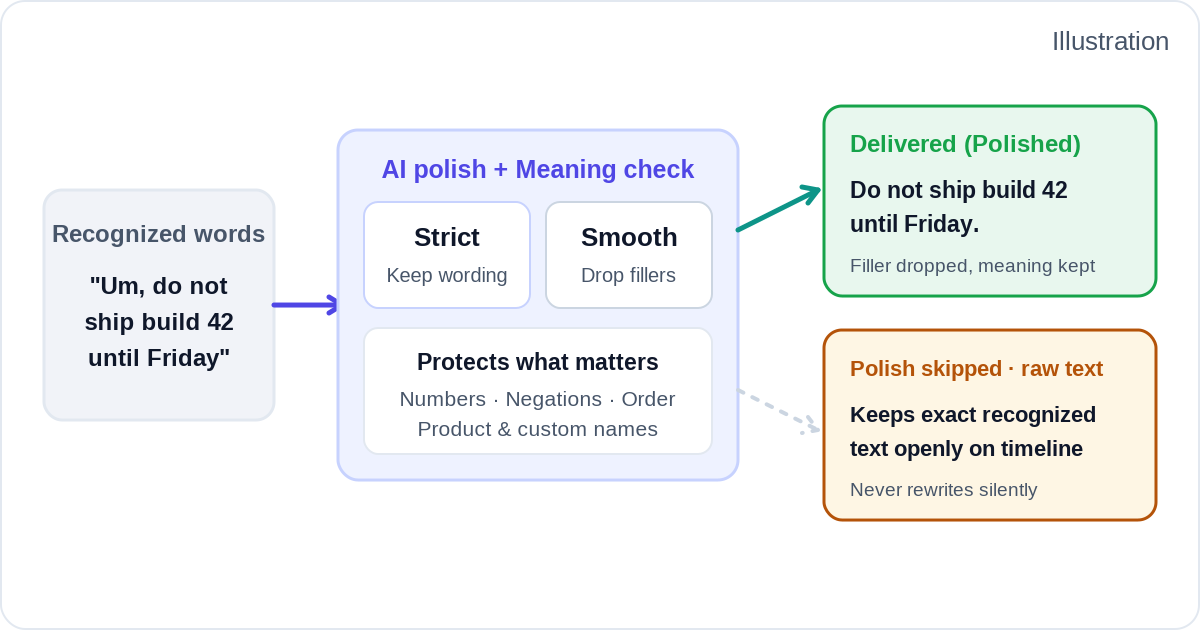
How does FlowMic stop AI cleanup from rewriting your meaning?
An over-eager language model can quietly drop a "not", alter a port number, or flip sentence order while trying to sound polished. FlowMic checks every polished line before delivering it to make sure numbers, negations, clause order, and saved terms survive intact.
Whenever a rewrite fails those checks or the model takes too long, FlowMic refuses to guess or rewrite silently. It falls back to your recognized words and stamps that line plainly on your phone timeline—Polish skipped · raw text or Polish not applied · raw text—matching the transparent status model covered in seeing what happened to every sentence.
When to turn on Second-pass smoothing
On long, multi-clause sentences in Realtime, the draft at your computer lands right away, though your phone record can still hold minor spoken repeats. Enabling Second-pass smoothing under Recognition and AI runs an extra cleanup pass for the sentence card on your phone without touching or overwriting text already injected on your computer.
- Open phone Settings → Recognition and AI.
- Keep AI polish on and select Strict for specs, numbers, or code, or Smooth for emails and notes.
- Save project spellings in Custom terms so critical names are locked in before cleanup runs.
- On Local LAN, make sure a language model is configured in the desktop app via the model setup guide; on Cloud relay, sign in on the computer first.
You can test a quick sentence on the Try it page or get the desktop and mobile apps on the download page.
Common questions
What is the difference between Strict and Smooth AI polish?
Strict fixes clear recognition mistakes and punctuation while staying close to your exact wording, though some fillers can still go. Smooth also removes filler words, false starts, and repeats and smooths grammar.
What happens if AI polish over-edits or times out?
Automated checks keep numbers, negations, word order, and meaning intact. If a suggested rewrite fails those checks or times out, FlowMic delivers the raw recognized text instead and marks it openly on your phone timeline.
Is AI polish a separate fourth mode alongside Realtime, Translate, and Organize?
No. FlowMic has three modes: Realtime, Translate, and Organize. AI polish is a switch inside Realtime mode.