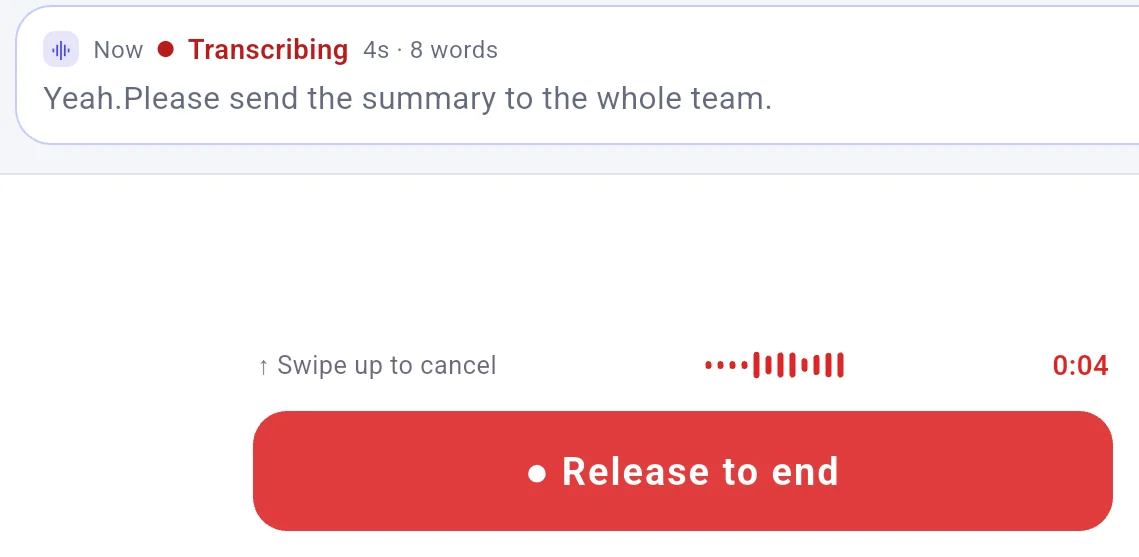
Dictate your thesis with AI polish turned off Hold the talk button on your phone, speak your draft, and the recognized text types into your computer when you let go.
Download Try it
Words on the phone show progress, not the final text. Turn AI polish off to skip sentence cleanup, though custom terms still apply and spacing, some fillers, and end punctuation can be tidied.
None of our tests ran with "AI polish" turned off; this rests on the app's wording and on reading its code.
AI polish starts on at Strict, which fixes mistakes and keeps your wording, though some fillers can still go.
You connect through "Local LAN" on your local network, or "Cloud relay" with FlowMic on the computer signed in.
The sentence landed in Notepad after tapping Deliver on the phone. What does not work or was not tested FlowMic makes no statement about AI detectors or school rules. Even without a model, recognized text differs from what you said, so reading your draft stays necessary. In 10 spoken Chinese sentences with synthetic speech, recognition changed the meaning in 2 of the 10, turning "tomorrow" into "today". For developer terms using the built-in speech model over "Local LAN", only 5 of 20 sentences had every term right. We did not test Microsoft Word or Overleaf, so test one paragraph in your document editor before dictating your thesis. On Windows and Linux under X11, text copies to the clipboard, pastes into the front window, and previous clipboard content returns, though a copy made while FlowMic pastes can be lost. Speaking "new line" leaves those literal words in the text, and spoken punctuation like "comma" was not tested. Words appear on the phone to show progress, not the final text. There is no word-by-word flow into your document, because the words land only after you let go of the button. On a 19-second sentence, live words on the phone moved for 8 to 9 seconds and stopped with "No new words have come back for a while", though the whole sentence landed after release. Check your cursor position before talking, because whichever window is in front receives the text. Password fields on Windows are not refused, so dictated words will land inside a focused password box. FlowMic at normal privileges cannot type into Windows administrator windows, and typing fails if FlowMic's own window is in front without a focused text field. Desktop supports Windows, macOS 11 on Apple silicon, and Linux x86-64 under X11. In phone settings under "Spoken language", choose from 8 languages: English, Chinese, French, Spanish, German, Japanese, Korean, or Russian. There is no auto-detection, and no numbers are published for individual languages, so do not assume they perform alike. More limits of this kind Across 15 spoken passages in "Organize" mode using a cloud model from DeepSeek on the computer, 14 yielded paragraphs and 1 was refused, keeping raw text. Fillers and false starts were removed, though "Organize" added or changed something in 4 of 15 test passages and needs reading before use. For example, recognized "because the train is a two" became "since the train ride is about two hours". Your computer must stay awake, with your target application in front and the cursor inside the text box. FlowMic works only in text boxes: there is no clicking, scrolling, window switching, or text selection by voice, no voice commands, and no computer hotkey. Press "Hold to talk" on your phone and keep your finger on it the whole time you speak. You must hold the button down, as there is no latch and no one-tap recording. On the phone timeline, "Delivered" means text reached the computer, not that it was typed into a window. On Windows, a paste no window picked up shows "Delivered · not injected · Resend", and you can recover text using "Copy", "Copy original text", or "Resend" on the phone, or "Re-inject" on the computer. Windows consoles turn a line break into a space without pressing Enter, while Mark mode loses words even though the phone shows "Delivered". In VS Code, Cursor, or consoles started by ssh, python, or wsl, a line break can run a command. On Linux under X11, xterm and the VS Code terminal panel receive nothing while the phone shows "Delivered". The iOS 15 App Store version is absent from mainland China and the European Union. macOS, iOS, Windows 11, Cloud relay, other phones, locked screens, and copied images were not tested. Outlook, Gmail, Slack, Notion, Google Docs, Teams, Discord, and Obsidian were not tested. We tested on Windows 10 and Ubuntu under X11 with an Android tablet over "Local LAN". Most entries were typed into the phone, and spoken prompts used a synthetic voice from a second phone rather than measuring human voice recognition. A few common questions Which mode should I use to transcribe speech without using a language model? Each recording goes through one mode: "Realtime" for transcribing speech, "Translate" for translating after finishing, or "Organize" for removing fillers and false starts in the same language. Changing mode empties the input box. Stay in "Realtime", because "Translate" and "Organize" always require a language model.
What happens to my text in Realtime mode when AI polish is turned off? The app states: "Off skips this step, but custom terms still apply and spacing, some fillers and end punctuation can be tidied." While off, "Realtime" sends nothing to a language model, matching the notice that "While it is off, Realtime sends nothing". Fixed rules still run without a model to handle your custom terms, spacing, and end punctuation.
Download Try it
Tested on FlowMic 0.3.120 on the computer and 0.3.118 on the phone, 6 November 2026.
Some counts come from FlowMic 0.3.119 on 5 November 2026 or noted test builds and were not repeated on 0.3.120.
Everyday scenarios: How people put FlowMic to work Skip copying text from your phone to your PC Dictate to your PC without a desktop microphone Dictate to your computer while pacing the room Dictate into your computer by holding a phone button Dictate into your X11 Linux desktop from your phone Dictate support replies directly from your phone 
 FlowMic