
%3c/title%3e%3cdesc%3eFlowMic%20mark%202.0%20optimized%20for%20dark%20surfaces.%3c/desc%3e%3crect%20x='92'%20y='52'%20width='96'%20height='150'%20rx='20'%20fill='%23818CF8'/%3e%3crect%20x='126'%20y='68'%20width='28'%20height='5'%20rx='2.5'%20fill='%230B1020'%20opacity='0.4'/%3e%3cpath%20d='M%2060%20160%20Q%2060%20232%20140%20232%20Q%20220%20232%20220%20160'%20fill='none'%20stroke='%23FAFAFA'%20stroke-width='12'%20stroke-linecap='round'/%3e%3crect%20x='133'%20y='232'%20width='14'%20height='30'%20fill='%23FAFAFA'/%3e%3crect%20x='98'%20y='260'%20width='84'%20height='11'%20rx='4.5'%20fill='%23FAFAFA'/%3e%3cg%20fill='none'%20stroke-width='7.5'%20stroke-linecap='round'%3e%3cpath%20d='M%2076%2057%20A%2018%2018%200%200%201%2091%2042'%20stroke='%238B93F8'/%3e%3cpath%20d='M%2063%2054%20A%2032%2032%200%200%201%2088%2029'%20stroke='%232DD4BF'/%3e%3cpath%20d='M%20204%2057%20A%2018%2018%200%200%200%20189%2042'%20stroke='%238B93F8'/%3e%3cpath%20d='M%20217%2054%20A%2032%2032%200%200%200%20192%2029'%20stroke='%232DD4BF'/%3e%3c/g%3e%3c/svg%3e) FlowMic
FlowMic Any network
Create your cloud account
Accounts are created only on the website. The phone has sign-in, not registration. After you register you are on Free: a free allowance for light trial and use. Pro and Max are monthly subscriptions — you start one under “Subscription” in the console, and you can cancel at any time.
- Open flowmic.app/signin.
- Tap Create account at the top (there is no separate /register address).
- Enter an email and a password. At least 10 characters, and at least two of: letters, numbers, or symbols.
- Accept the terms and tap “Create account”.
Web · flowmic.app/signin · Create account
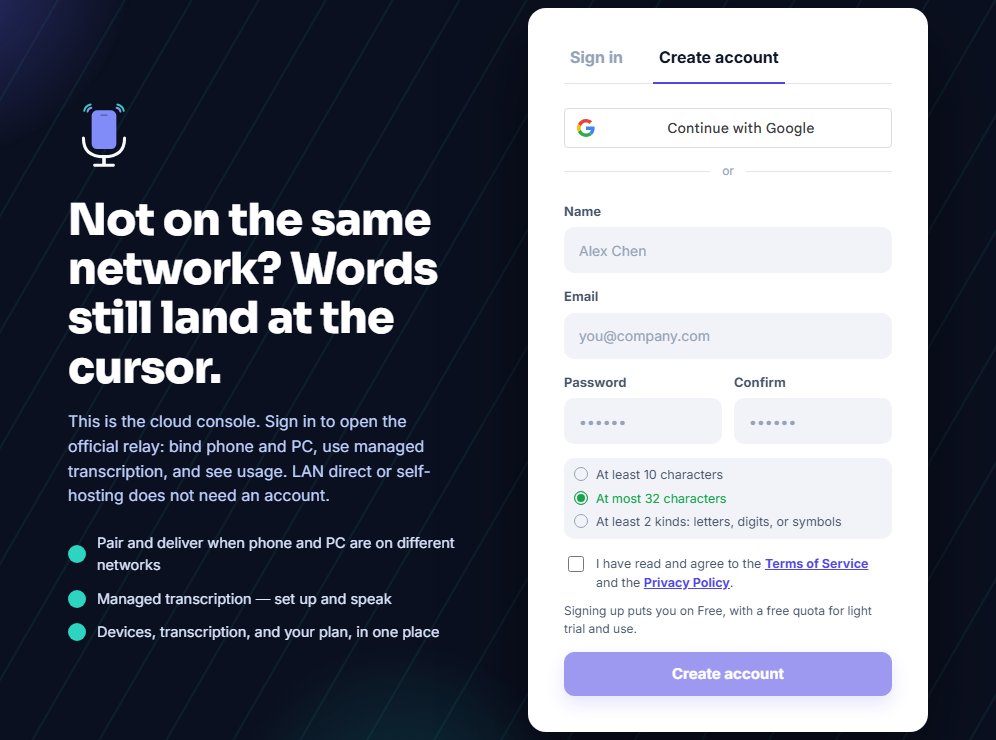
Registration is a tab on the sign-in page, not another URL.
The phone app says the account is created on the website. Copy https://flowmic.app/signin into a browser. Do not look for a register button inside the app.